|
Os motores de busca de Datasheet de Componentes eletrônicos |
|
|
Os motores de busca de Datasheet de Componentes eletrônicos |
|
74HC393D Folha de dados(PDF) 2 Page - Burr-Brown (TI) |
|
|
|
|||||||||||||||||||||||||||||
74HC393D Folha de dados(HTML) 2 Page - Burr-Brown (TI) |
|
|
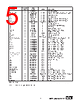
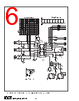
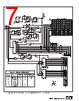
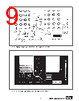
2 / 13 page  2 ® DEM-ADS7843E/45E INSTALLATION The DEM-ADS7843E/45E evaluation fixture is designed for stand-alone evaluation or evaluation using the clocking network on the board. Stand-alone evaluations imply that the A/D converter is powered by J4 (power supply connec- tor) and the user is put to the task to provide analog and digital input excitation. This is achieved by removing all five jumper tops of JP4 and using J1 and J2 for direct connec- tions to the device under test (DUT). In contrast, the DEM-ADS7843E/45E/45E board has the appropriate digital interface circuitry to drive the DUT data clock, chip select, and serial data in which is coordinated with the BUSY and PENIRQ to provide serial and parallel output data. This kit includes the following items: ADS7843E Evaluation Fixture—A2518 DEM-ADS7843E/45E Documentation (LI-522) ADS7843E (5 samples) ADS7845E (5 samples) The DEM-ADS7843E evaluation fixture has two positions on the board for the A/D converter to be installed in. The first position is the socket, DUT1 on the board. This spring- loaded socket allows the user to quickly swap in or out the device that is being evaluated. The other option on the board is the position X1, which is a solder location for the DUT. If this option is chosen, the user must solder the DUT directly to the board. This position is only useful for 2 or 3 solder cycles. CAUTION: DO NOT connect the a device into the DUT1 socket and have another device soldered to the board in position X1 at the same time. The additional equipment required to do a complete evalu- ation of the performance of the ADS7843E or ADS7845E comprises of: +5VDC power supply Voltage or current signal source 4-Wire (ADS7843E) or 5-Wire (ADS7845E) Resistive Touch Screen To install the DEM-ADS7843E/45E evaluation fixture, con- nect the appropriate power supply to J4. When power is applied to the DEM-ADS7843E/45E, the red LED on the board should light. USER CONFIGURATIONS The DEM-ADS7843E/45E evaluation fixture provides the right combination of jumper options and support circuitry to allow for a variety of evaluation configurations. Throughout this data sheet, numerous references are made to the ADS7843 and ADS7845 A/D converters. For more information con- cerning these devices, refer to the ADS7843 or ADS7845 data sheet. The circuit is laid out with a four-layer board. The two outside layers are for circuit traces and the inner layers are the ground and power planes. The analog and digital planes of the circuit is separated through the middle of the board all the way to the power supply connector, where they are joined. The circuit diagram and layout diagrams for the DEM-ADS7843E/45E is shown in Figure 1 and Figures 4 through 7. J1 Analog Input Interface. Each connector is labeled. J2 Digital I/O Interface. Each connector is labeled. J3 Parallel Output Port. J4 Power Supply Connector. This connector powers the DUT and digital network. Refer to the ADS7843 or ADS7845 product data sheet for power supply restrictions. All digital chips on the DEM-ADS7843E/45E board are capable of operating with supply voltage from 2.7V to 5.25V. P1 External DCLK Connector. TABLE I. Connectors (Jx and P1) Assignments. JUMPER NUMBER FACTORY SETTING DESCRIPTION JP1 B Voltage reference. This setting connects A/D converter reference to +VCC. JP2, JP11, JP10 JP2 = Not Installed Inverted or non-inverted option for PENIRQ of the ADS7843 or ADS7845 when driving this pin through pin 2. JP11 = Not Installed This setting sets this pin HIGH and connects this pin to J2. JP10 = Not Installed JP3 D, F, G Hardwire digital jumpers for DIN serial code. This setting configures the A/D converter for S = HIGH, A2-A0 = 001, MODE = LOW, SGL/DIF = HIGH, PD1-PD0 = 11. JP4 A, B, C, D, E This jumper connects the clocking network to the DUT. JP5, JP6 JP5 = A Clock speed options. This configuration sets the board using Y1/10 as the DCLK frequency. JP6 = B JP7, JP8 JP7 = B Optional 16- or 24-bit operation. This configuration sets the board for 16 DCLK per conversion cycle. JP8 = A JP9 B Used to personalize the board for the ADS7843 or ADS7845. Position B = ADS7843 or ADS7845. TABLE II. Jumper (JPx) Assignments. |
|
|
Ligação URL |
| ALLDATASHEET é útil para você? [ DONATE ] |
Sobre Alldatasheet | Publicidade | Contato conosco | Privacy Policy | Link para a ficha técnica | roca de Link | Lista de Fabricantes All Rights Reserved©Alldatasheet.com |
| Russian : Alldatasheetru.com | Korean : Alldatasheet.co.kr | Spanish : Alldatasheet.es | French : Alldatasheet.fr | Italian : Alldatasheetit.com Portuguese : Alldatasheetpt.com | Polish : Alldatasheet.pl | Vietnamese : Alldatasheet.vn Indian : Alldatasheet.in | Mexican : Alldatasheet.com.mx | British : Alldatasheet.co.uk | New Zealand : Alldatasheet.co.nz |
|
Family Site : ic2ic.com |
icmetro.com |
 Portuguese ▼
 English
 Chinese
 German
 Japanese
 Russian
 Korean
 Spanish
 French
 Italian
 Portuguese
 Polish
 Vietnamese
 Indian
 Mexican
 British
 New Zealand